
Do more at a Chase ATM
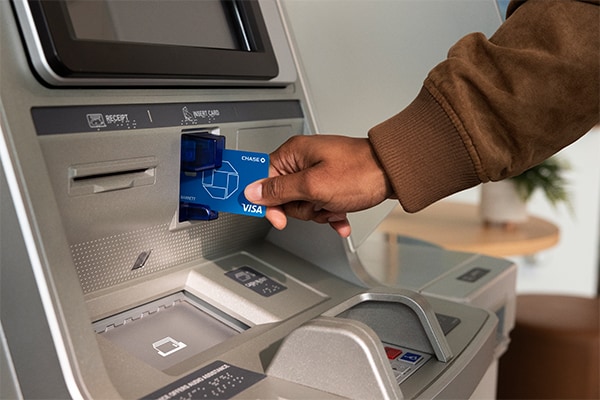
Chase has more than 14,000 ATMs to help you manage your money

Get cash
Quickly access cash with the fast cash preset options or withdraw an amount you enter.

Make deposits
Easily deposit either cash or checks and choose your receipt option.

Manage your account
Quickly, and with no fee, check your balance or transfer funds between accounts.
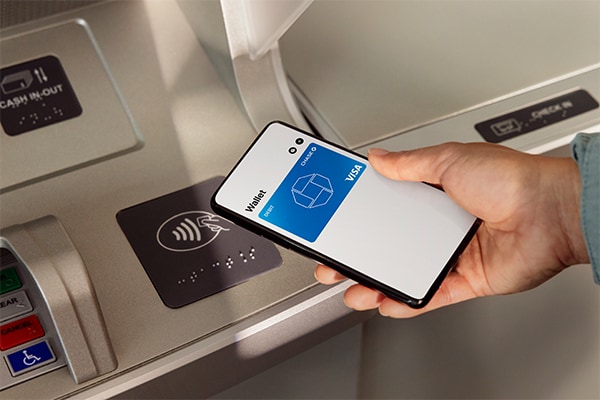
Use your debit card in your digital wallet to access Chase ATMs
To add your debit card to your digital wallet or smartwatch, open the wallet app on your device and follow the instructions. Eligible mobile wallets include Apple Pay®, Google Wallet™ and Samsung Wallet.
To use a Chase ATM if you don’t have your debit card, open your digital wallet on your phone or smartwatch, look for the contactless symbol on the ATM and hover your phone or smartwatch over it.
Unlock added convenience at a Chase ATM

Pay your Chase bill
At select Chase ATMs, you can pay your Chase credit card, mortgage or home equity bill with cash or from your Chase checking or savings account.

Personalize your ATM experience
Set your preferences and customize your experience on the Chase Mobile® app or chase.com or while at the ATM. Choose which accounts to display, receipt option, Quick cash amount and preferred bill denominations.
Use America's #1 Banking App and save a trip to the ATM
Download the Chase Mobile® app and enjoy convenient features like Zelle®, Chase Online℠ Bill Pay and Chase QuickDepositSM to easily manage and move your money.
Find a Chase ATM or branch
To find a Chase ATM or branch near you, tell us a ZIP code or an address.
Frequently Asked Questions
Answers to the most common questions
Use our locator to find an ATM or Chase branch.
Cardless ATM transactions require a digital wallet and an ATM PIN to complete the ATM transaction. In addition, we recommend you use the security features available on your phone.
You can make check and cash deposits at almost any Chase ATM, 24 hours a day, 7 days a week. Use our locator to find an ATM or Chase branch.
Generally, for most accounts, you may withdraw funds the next business day after the business day you deposit them, whether at the ATM or at a teller. In some cases, you may not be able to immediately withdraw or write checks against deposited funds. If funds from a deposit become available, and you can withdraw funds, that does not mean the check or other item you’ve deposited is good, has cleared or has been paid by the paying bank. It’s possible that the item will be returned unpaid months after we’ve made the funds available to you, and you’ve withdrawn them. No one, including our employees, can guarantee that a check or other item will not be returned. See the Deposit Account Agreement (PDF) for additional information.
Conveniently deposit cash and up to 30 checks.
Please call the Chase Customer Service number that is printed on the ATMs.
Yes, you can set up or change preferences by entering your PIN, pressing the Main Menu button and then clicking the Preferences button at the bottom of the screen.
You can preset your:
- Language preference. Select the language you want to use for your future ATM visits, and we’ll remember it next time.
- Receipt preference. Choose whether you want us to “always print,” “never print” or “always prompt” for a receipt.
In addition to depositing cash and checks and making withdrawals, you can make transfers, view your balances, see your recent transactions and make payments to your credit card with cash or a funds transfer.
Cardless ATM access allows customers to access Chase ATMs using an eligible Chase debit card that has been loaded into an Apple Pay®, Google Wallet™ or Samsung Wallet digital wallet on your phone or smartwatch. Once you have successfully loaded your card into your digital wallet, you no longer need to have your physical card to make transactions at Chase ATMs.
Instead of using your physical card for transactions or purchases, you can use your eligible phone or smartwatch. The digital wallet uses a secure token, so no customer information is stored. This makes your transactions more secure than when using your card.
Apple Pay®, Google Wallet™ and Samsung Wallet digital wallets can be used at our cardless ATMs.
Play how-to video or choose your digital wallet below for instructions on how to add your card:
- Open the digital wallet on your phone or smartwatch and select your debit card
- Once at the ATM, open the digital wallet on your phone or smartwatch and select your eligible Chase debit card. Eligible digital wallets include Apple Pay®, Google Wallet™ and Samsung Wallet.
- Tap phone to ATM
- Tap your phone or smartwatch on the contactless symbol on the ATM. Some digital wallets may prompt you to authenticate the transaction using an additional security feature, such as a fingerprint, passcode or facial recognition.
- Enter ATM PIN and complete transaction
- Once the ATM has successfully identified the eligible card in your digital wallet, you will be prompted to enter the ATM PIN associated with your card. ATM transactions can be completed the same as if you used your physical card.
Cardless ATM access is currently available on Chase ATMs where you see this cardless symbol:

Chase cards currently eligible for cardless ATM access include: consumer debit cards (excluding CPC Privileges card) and business debit cards (excluding Business Associate cards).
Using cardless ATM access is just like using your physical card at the ATM. You can complete the same types of transactions, and your withdrawal limits are the same.
Not at this time.
Contact us or schedule a meeting with a banker.