
CHASE SECURITY CENTER
What you can do to help protect your finances
Here you’ll find the tools we’ve developed to help you boost your account security, as well as our tips for staying safe online.

Add extra layers of security at sign-in
We’re continuously working to help make banking safer. These are security tools we recommend adding to your account.

Add a layer of protection by enrolling a trusted device
A trusted device is a smartphone that you’ve verified with the Chase Mobile® app. It adds an extra layer of protection against unauthorized access, even if someone has some of your information.

Add a passkey for more secure sign-in
Passkeys make signing in faster and more secure. They let you use your face, fingerprint or device passcode to sign in. The passkey can’t be guessed, or leaked and it’s extremely difficult to steal.

Turn on extra sign-in security for the Chase Mobile® app
Help improve your account security by adding an additional verification step when you sign in to your Chase Mobile® app. Once you set it up, you’ll be asked to confirm your identity by entering your phone’s passcode or screen lock code as a second step to your sign-in. On chase.com, you can also choose to add a one-time code as an extra layer of protection.
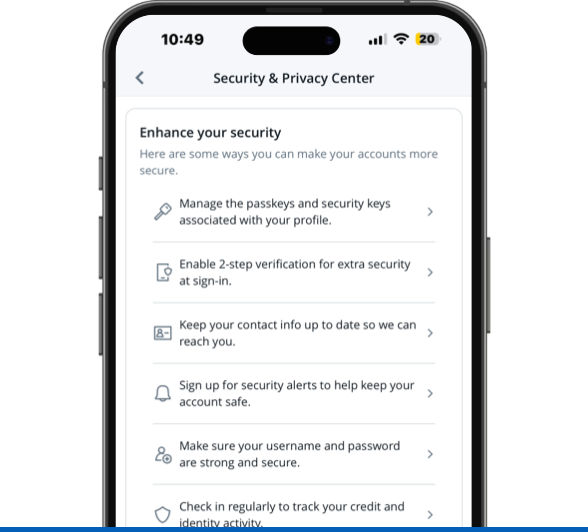
Activate enhanced security for added account protection
Manage your security settings and add extra layers of protections to your account in the Chase Mobile® app or chase.com, including:
- Establish a Trusted Contact Person
- Add account alerts
- Review linked apps and devices
- Enroll in Chase Credit Journey® to receive free credit and identity monitoring
Stronger security can start with healthy habits
Taking a few simple steps can help secure your information and lower your risk of fraud and scams.
Be careful using checks
Writing checks
Fraudsters can steal checks from mailboxes or those that aren’t properly destroyed, then use your personal information to create counterfeit checks or sell your info.
Depositing checks
Scammers send fake checks and claim to have “overpaid,” asking you to send money back before the bank discovers the check is bad — which can take weeks. If you’ve spent or sent back the money, you could be responsible for the loss.
Instead of checks, consider digital ways to pay
For everyday expenses, use Chase Online℠ Bill Pay
It’s easy to use for things like rent, utilities, car payments and credit cards. It can be safer than checks because the payment we send for you doesn’t include your account number.
Use Zelle® to pay people and businesses you know and trust
Instead of writing a check for things like a birthday gift or paying a babysitter, Zelle® is a fast and convenient way to send and receive money with people and businesses you know and trust who have an eligible account at a participating U.S. bank.
Review these password tips for all your online accounts and apps
Consider using passkeys when available
Passkeys let you sign in using your fingerprint, face or device PIN instead of a password. They’re harder for scammers to steal and are more secure than a password.

If passkeys are not available, consider using a digital password manager
A password manager is a tool that works across multiple devices and helps provide you with extra security by suggesting and storing strong, unique passwords for websites and apps. Password managers can also store passkeys.

Watch-outs to help you stay safe online
Scammers actively exploit outdated software
Outdated apps, browsers and operating systems can contain known security weaknesses that scammers look for and take advantage of.
What you share online can be used to impersonate you
Scammers use photos, posts and even clone short audio clips to convincingly pose as you or someone you trust.
Fake apps are used to spread malware
Scammers use free offers or familiar names to trick people into downloading apps that secretly install malware or steal information.
Social connections can build convincing scams
Accepting requests from people you don’t know can reveal details about you and your friends that scammers use to seem credible and build trust with others.
Personal details are often used to unlock accounts
Sharing information like birth dates, previous addresses or family names may help scammers answer security questions on accounts to steal identities.
Public Wi-Fi can make it easier for scammers to intercept data
Many public networks lack basic security, and some are designed to look legitimate while capturing information.
Frequently asked questions
Locking a Chase debit or credit card can be done by logging into your Chase account and following the steps below for mobile or click here to get started.
- Log into your Chase account
- Select the account associated with the card you want to lock or unlock
- Tap on “Manage account”
- At the top of this page, tap “Lock & unlock card”
- Tap “lock” or “unlock” to change your card’s status
Stop communicating with the suspected scammer immediately. If it was a phone call, hang up. If it was a text message or email, do not reply, click links or download attachments. If you shared personal information, account information or sent money, contact us as soon as possible so we can help assess your situation and discuss next steps.
Always check the web address before entering personal or account details. It should start with "https://" and ends in "chase.com". Be cautious of websites that contain misspellings, additional words, unusual characters or look-alike domains designed to impersonate legitimate companies.
Sign up for 2-step verification and get extra security when you sign in to chase.com. You’ll be asked to verify it’s you by entering a one-time code.
- Log into chase.com and click on the “Security & Privacy” tab at the top of the page
- Find the “Enhance your Security” section in "My Account"
- Click “enable 2-step verification for extra security at sign-in”
- You can toggle the switch to “Use 2-step verification every time you sign in on a browser”
- Turn on “Receive one-time codes by email” if you also want the option to receive codes via email
- Click “Yes” or “Save” to confirm your changes
Note: Depending on your account type, you may have to select “Security” then “Manage security & privacy” to find these options.
The Chase Mobile® app is compatible with the latest security measures like Apple’s Face and Touch IDs or Android’s biometric recognition, letting you use your face or fingerprints to log into your account. This way, you can skip the passwords while securely accessing your accounts.
- Log into your Chase Mobile® app and tap on the “Profile & Settings” icon in the top right corner
- Tap on “Sign-in preferences”
- Select “Face-ID & Passcode” for Apple devices or “Fingerprint sign in” for Android devices
- Toggle the switch to turn on your biometric security features
You can add extra protection to your account by naming someone you trust that we may contact if you can’t be reached and we notice signs of unusual activity. Some examples include if we have questions about your health, potential fraud, cognitive decline or financial exploitation. To be a Trusted Contact Person, the individual needs to be at least 18 years old, reachable by phone or email and should be someone who you know has your best interests at heart.
The person you name does not need to be a Chase customer. They will not become a beneficiary or a joint owner and cannot access or make decisions about your account. You can edit, delete or add a Trusted Contact Person any time here.
To enhance online security, consider using a passkey, enabling 2-step verification, keeping software & hardware updated, installing reputable antivirus software, and being cautious with email and online activities. Using a virtual private network (VPN)—a service that protects your internet connection and online privacy by hiding your IP address—can add extra protection. These security practices can help reduce the risk of identity theft, account takeover, fraud and unauthorized access to your online accounts.
To help improve security on your mobile phone consider:
- Keeping your operating system up to date
- Being cautious when installing apps
- Avoiding unsecured, public Wi-Fi networks & charging stations
- Setting up a “remote wipe” feature, if available, in case your phone is lost or stolen
Explore the Chase Security Center


Help safeguard seniors
Information, resources and tools for older adults and caregivers.

Students/young adults
Guidance for teens, students and parents.

Protect your business
Resources and tools to help protect your business from fraud and scams.


We’re here to help
When in doubt, contact us before you share your account information or send money. Call us using the number on the back of your card or account statement, or visit a branch location.