
Checkout with Paze℠
There's no need to grab your wallet. By selecting Paze at checkout, you can quickly access all your eligible Chase credit and debit cards to complete your purchase.

Seamless shopping with the bank you know and trust

Added security
Rest easy. Paze doesn't share your actual card numbers with online merchants.

Convenience
It's simple. You don't have to download new apps or remember a username and password.

Speed
Enjoy fast checkouts. There's no need to search for card numbers or manage cards on site.
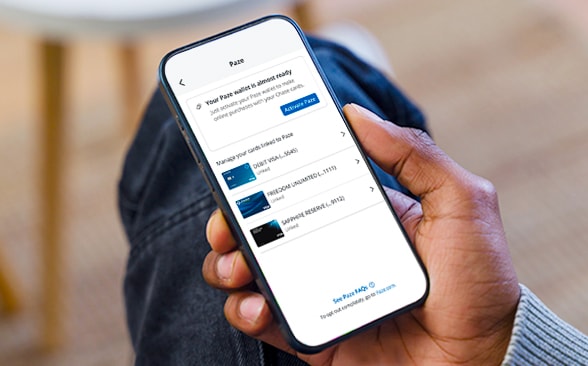
Shop smart, not hard
Activate Paze using the Chase Mobile® app or on your first purchase with a participating online merchant — you only have to do this once.
- Sign in to the Chase Mobile app.
- Select one of your credit or debit card accounts.
- Go to "Manage Account'' and choose "Digital Wallets."
- Select "Activate Paze."
How to use Paze
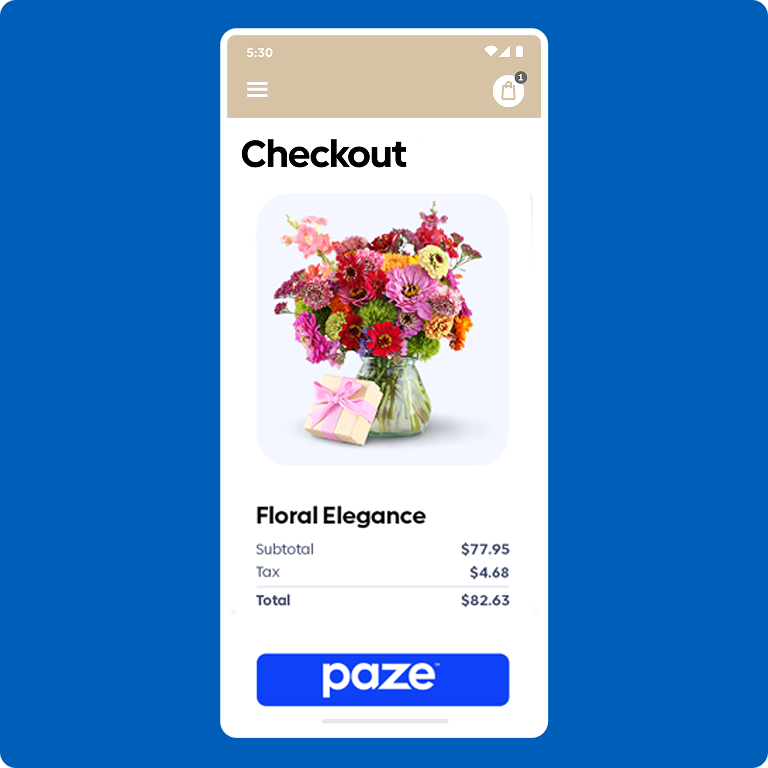
Step 1: Select
Select Paze at checkout the next time you're shopping with a participating online merchant.
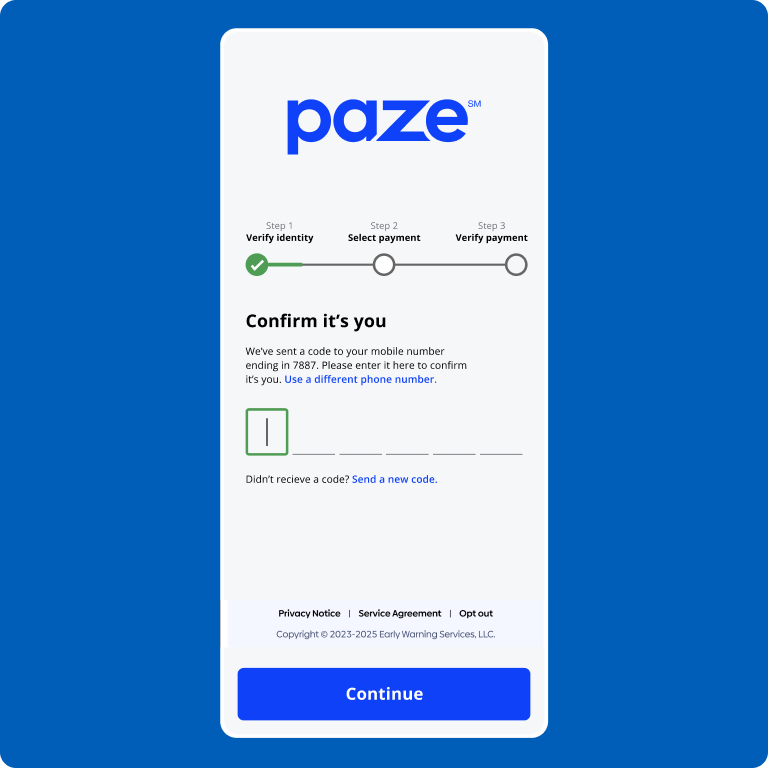
Step 2: Verify
Verify your identity by entering a security code that's sent to your phone.
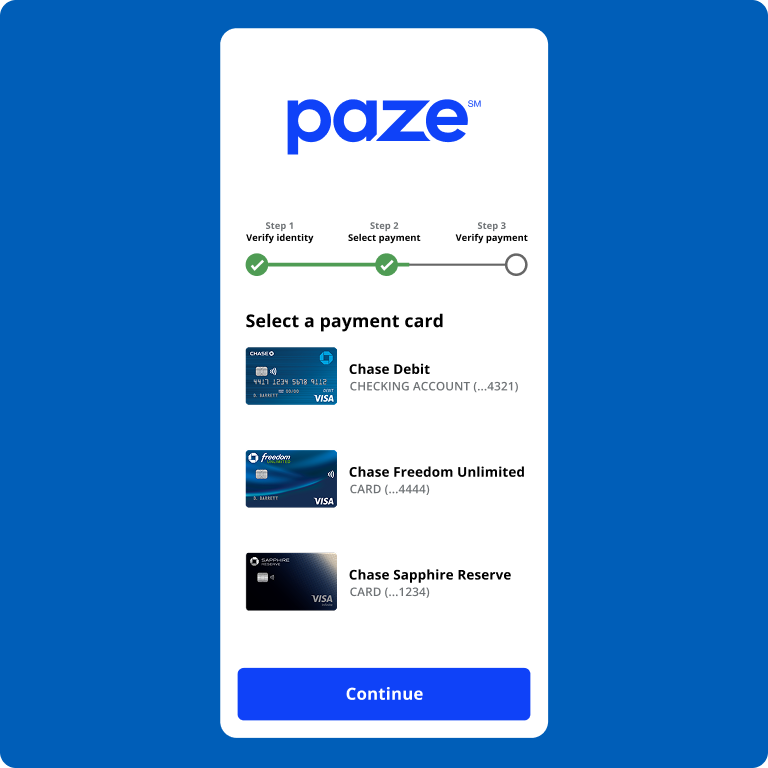
Step 3: Check out
Choose the eligible Chase credit or debit card you want to use and complete your purchase.

Participating merchants
Paze will appear as a payment option at checkout with participating online merchants. New retailers will continue to be added for your convenience.
Want to learn more?
Check out this video to explore some helpful tips and even more info about Paze.

Who's eligible to use Paze?
You can use Paze if you're a current Chase customer with access to the Chase Mobile® app and you've used an eligible Chase card for a recent online purchase.
What if I want to opt out of Paze?
Contact Chase through the Secure Message Center or by calling 1-800-935-9935 to request that your eligible Chase credit and debit cards are not made available for use.
If your eligible Chase credit and debit cards are already in Paze, you can remove them in the Chase Mobile app. You can also opt out of Paze in the Chase Mobile app.
Frequently asked questions
Paze is an online checkout solution provided by Early Warning Services, LLC, with Chase and other participating banks including Bank of America, Capital One, PNC, Truist, U.S. Bank and Wells Fargo. Paze lets you access your eligible credit and/or debit card(s) from all of your Paze participating financial institutions in one place so you can conveniently checkout online with added security, because your actual card number is not shared with merchants.
To use Paze, select it as a checkout option from participating online merchants’ sites. Activate Paze by accepting the terms of use for Paze and confirming your identity. Eligible Chase cards will be shown in Paze. Simply choose the card you want to use and complete your purchase. It's that easy.
You can check out with Paze at any participating online merchant.
Click here to view the list of merchants that offer Paze: Paze.com/merchant-directoryOpens overlay
Paze allows you to quickly access your eligible debit and/or credit cards all in one place. It's convenience with added security, because your actual card number is not shared with merchants. Check out online quickly and easily with no additional apps to download, new Paze usernames or passwords to remember. Paze doesn’t share your actual card number with online merchants, so you can browse and buy with confidence.
Existing Chase consumer customers with a digital profile (i.e., if you signed in to Chase Online℠ or the Chase Mobile® app) and have recently made an online purchase using your Chase debit or credit card are eligible for Paze℠. If you open a new credit card or deposit account with a debit card and have a digital profile, your new card will be automatically added to your Paze℠ wallet. Paze℠ isn't currently available to Chase customers under the age of 18, business customers, commercial customers or credit card authorized users. Chase First Banking℠ debit cards, Chase High School Checking℠ debit cards, Chase business credit cards (such as Ink Business℠ and Private Bank credit and debit cards aren't eligible.
Paze works with many major credit and debit cards from participating U.S. financial institutions. Existing eligible consumer (not business or commercial) cards can be used with Paze at this time and will only appear in Paze if the card has recently been used for an online purchase. Chase First Banking℠ debit cards, Chase High School Checking℠ debit cards, Chase business credit cards (such as Ink Business℠), Private Bank credit and debit cards, Chase Private Client Privileges cards, joint checking account debit cards, ATM-only cards, First Republic Bank debit cards, and authorized user cards are not eligible.
There is no additional cost to use Paze. You'll remain responsible for normal card charges, if any, such as interest on revolving balances or applicable fees, etc. The terms of your applicable cardmember or account agreement, including any account related fees, apply.
When you use Paze, online merchants won't see your card numbers. Paze replaces your sensitive card data with a token, which offers a unique set of random letters and numbers and is what is used when you make a payment with that online merchant. The token replaces your card information which provides added security when stored with Paze, because your actual card number is not shared with merchants.
Purchases made with your Chase credit and/or debit cards have Chase Zero Liability Protection for unauthorized card transactions. This means that you won’t be liable for any unauthorized transactions as long as they are reported promptly. Certain limitations apply. Please see your credit card and/or deposit account agreement for details.
See the full list of Paze FAQ on Paze.comOpens overlay.
If you'd like to remove existing Chase credit and/or debit cards in Paze, you can remove them in the Chase Mobile® app within Digital Wallets and Paze. If you don't want your eligible Chase debit or credit cards automatically linked to Paze, contact Chase through the Secure Message Center or by calling 1-800-935-9935.
You are able to opt out entirely across all participating banks at paze.com/optoutOpens overlay. Opting out at mywallet.paze.comOpens overlay will delete all cards and prevent cards from being automatically added by any bank or credit union who offers Paze now or in the future.
If you have additional questions, please contact your participating bank or credit union.
You don't need to sign up or download a new app; just look for the Paze logo when you check out at a participating merchant or enter the email address you use with your bank or credit union when shopping on line.
A passkey is a digital credential that allows you to sign in and authenticate your Paze wallet without having to enter an SMS one-time passcode. This allows for a faster, more seamless checkout experience while keeping your information secure. With a passkey you'll be prompted to sign in using your device's authentication methods like facial or fingerprint recognition, a PIN or the password for your device. When checking out with Paze, you might be prompted to register for a passkey, which you can always manage at mywallet.paze.comOpens overlay.