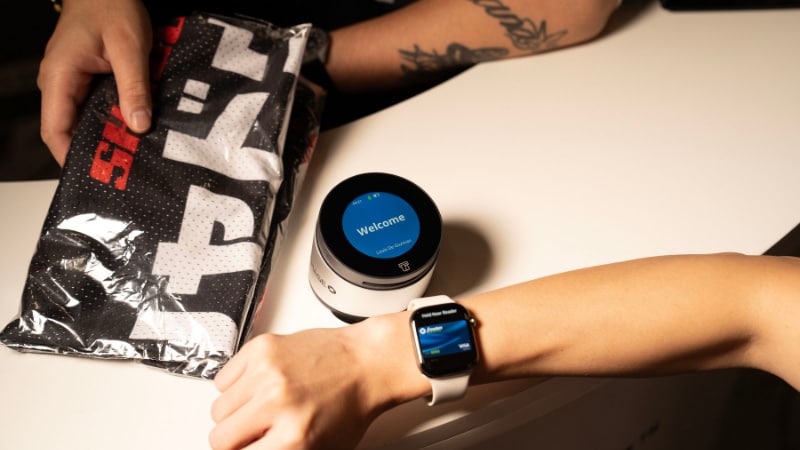
Retail POS systems: What to know
Presented by Chase Payment Solutions®.

Key takeaways
- Retail point of sale (POS) systems act as centralized hubs, helping you manage sales, inventory, customer relationships and reporting.
- These systems can connect in-store and online sales, unifying data for a consistent omnichannel experience.
- When choosing a POS, some factors you may want to consider are scalability, robust security, integrated payments and customer support.
In today's fast-paced retail landscape, your POS system is more than just a way to ring up sales. Today’s solutions can power efficiency, boost customer satisfaction and fuel your growth. Whether you run a boutique or a big-box store, understanding how these systems work can help you make the most of every transaction.
This article will cover what a retail POS system is, how it could benefit your business and some features to consider so that you can select a system that aligns with your business’s needs and goals.
What is a POS system in retail, and why does it matter?
A retail POS system is built with your business in mind. It brings together hardware and software to help you manage everything from inventory and payments to customer relationships and analytics. At its heart, a POS system connects all the moving parts of your store, making day-to-day operations smoother and more connected.
POS systems can offer numerous benefits. These systems have the potential to speed up checkout processes, reduce wait times and improve customer satisfaction. They can also help minimize human error in pricing and inventory management. By centralizing your operations, you can get a clear, big-picture view of how your business is performing—across every channel.
Some features to look for in a retail POS system
Today’s retail POS systems go far beyond basic transaction processing. They’re designed to help you run your business smarter, not just faster. As you explore your options, look for features that support growth and streamline everyday tasks.
You may want to consider the following features as you narrow down your options.
Hardware features
The hardware behind a POS system is designed to be sleek, adaptable and intuitive to use. Here are some options you might find:
- Contemporary design: Present-day POS hardware often features minimalist designs that aesthetically complement retail environments.
- Flexible form factors: POS systems can take many shapes, from compact all-in-one card terminals that combine payment, receipt printing and display, to smartphone-based solutions where the entire POS operates on a mobile device, with an optional credit card reader. More elaborate setups may include any combination of separate customer-facing and seller-facing displays, standalone terminals, receipt printers, barcode scanners and cash drawers.
- Accessories: Beyond the main device, modern POS systems often integrate with a suite of accessories, including portable card readers for on-the-go sales, receipt printers, barcode scanners and secure cash drawers.
Software features
There are software features to help you take payments and run your business in one place, which may vary by system and POS provider. The most advanced software may help orchestrate complex retail operations through these features:
- Inventory management: Allows retailers to track stock levels process returns and exchanges, manage product variations and automate reorder alerts. An effective system helps to minimize stockout or overstocking and maintain accurate product availability across all sales channels.
- Flexible payments: Can accept a wide range of payment options, from traditional credit and debit cards to mobile payments and digital wallets. This flexibility helps meet customer preferences and streamlines the checkout process.
- Customer management and loyalty programs: Typically includes Customer Relationship Management (CRM) tools to capture customer data, track purchase history and manage loyalty programs. This enables personalized marketing efforts and targeted promotions that help foster customer retention.
- Reporting and analytics: May offer in-depth reporting and analytics capabilities, providing insights into sales trends, peak hours, best-selling products, employee performance and more.
- Third-party integrations: Usually integrates with accounting software, e-commerce platforms, employee scheduling software and payroll services, payment gateways and other B2B software (integrated software vendors). These integrations could create a unified ecosystem, potentially reducing manual data entry and potential errors.
Additional features
Beyond core hardware and software, systems with the following qualities may help set your business up for long-term success and improve user satisfaction:
- Ease of use and intuitive interface: A system that requires minimal training to operate may reduce training time for new employees and minimize errors during busy periods.
- Scalability: The ability to grow with your business can help you avoid a complete overhaul down the line. You may want to consider a system that can smoothly handle increased transaction volumes, additional locations and new product lines.
- Fast funding: Some providers offer same-day access to funds when using a compatible business checking account. While not a core software feature, this could be a helpful consideration when choosing a POS provider.
- Reliable support: When issues arise, quick resolution from knowledgeable support staff could mean less downtime and lost sales. That’s why a system with 24/7 customer support can be beneficial.
- Security: To help you protect both sensitive customer and business data, look for systems with robust encryption, payment card industry (PCI) compliance, fraud prevention tools and secure cloud storage.
E-commerce and payments: Extending retail POS into digital channels
Retail today is often omnichannel, which means it extends beyond the traditional brick-and-mortar storefront. If e-commerce is part of your retail ecosystem, you may want to consider a POS system that integrates with digital channels, bridging the gap between in-store and online sales.
These systems can help ensure consistent inventory management across both physical and e-commerce stores, potentially preventing overselling or stockouts whether an item is purchased online or in person. Customer data and loyalty programs also often remain unified, allowing for a consistent customer experience and personalized engagement regardless of how they choose to shop.
Integrating your retail POS with your e-commerce platform can also make it more efficient to offer services like “buy online, pick up in store” (BOPIS), which is a feature some shoppers may appreciate.
10 tips for choosing a retail POS for your business
Choosing the right POS system can make a difference for your business. Here are some tips that may help you find the right fit:
- Assess your specific needs: Before exploring features, make a list of what your business requires—such as store type, typical transaction volume, inventory complexity, and the kind of customer experience you want to provide.
- Prioritize integrations: Ensure the POS system can easily connect with your existing accounting software, e-commerce platform and other business tools to create a unified operational ecosystem.
- Evaluate scalability: Choose a system that can grow with your business. That means it can handle increased sales, additional locations and new functionalities without requiring a costly replacement down the line.
- Focus on security: Look for strong security features like encryption, PCI compliance and fraud detection to help protect your business and your customers' sensitive information.
- Consider cloud-based systems: These systems often provide flexibility, accessibility from anywhere, automatic updates and lower upfront costs compared to on-premise solutions.
- Try it out: A user-friendly interface may improve customer satisfaction, simplify training and increase sales speed.
- Research customer support: Look for providers with reliable, responsive, and easily accessible customer support offered through various channels (phone, email, chat) to assist with any issues.
- Understand total cost of ownership: Beyond the initial purchase, you may want to consider ongoing fees for software subscriptions, payment processing, maintenance and potential hardware upgrades.
- Verify reporting and analytics capabilities: Data-driven insights into sales, inventory and customer behavior may facilitate more informed business decisions. Look for comprehensive and customizable reports.
- Check for mobile and omnichannel capability: If you plan to sell on-the-go or integrate online and in-store sales, confirm the POS supports mobile devices and facilitates a cohesive omnichannel experience.
In summary
A retail POS system can be an invaluable tool for retail businesses, doing more than just ringing up sales. By bringing together sales, inventory, customer management and analytics, it could potentially help you work smarter and grow faster.
By considering hardware and software features, choosing a reliable provider and focusing on integrations, security and scalability, you can empower your retail business for success in today's dynamic market.
To sign up for Chase Payment Solutions, reach out to a Payments Advisor at 1-877-843-5690 or connect with us.
Retail POS FAQs
What’s the difference between retail POS and other POS systems?
While all POS systems process transactions, a retail POS is specifically designed with features tailored to retail environments. This includes advanced inventory management for diverse product lines, CRM tools for tracking customer preferences, reporting on sales trends and integration capabilities for e-commerce and loyalty programs.
Other POS systems, like those for restaurants, might prioritize table management, Kitchen Display Systems (KDS) and menu customization. Salons may use POS systems that include features like service and product management, appointment scheduling and client profiles.
How much does a retail POS cost?
There are a few areas that make up the total price of a retail POS system:
- POS hardware: Around $60 to $800+ per device (depending on features/complexity).
- Credit card processing fees: Around 2.3%–3.5% plus $0.10–$0.30 per transaction.
- Add-on features and subscription fees: Depending on your system, anywhere from $0 to $149+ monthly.
In general, the cost of a retail POS system varies widely, based on factors such as the provider, features included, hardware requirements, number of terminals and subscription model (cloud-based vs. on-premise). You might incur upfront costs for hardware and software licenses, followed by recurring monthly or annual subscription fees. Payment processing fees are typically a separate cost to consider.
How long does it take to set up a new POS for retail?
It may take a few hours to several weeks to set up a new retail POS system as it largely depends on its complexity and the size of your business. For example, a basic cloud-based system with minimal inventory can be set up in a few hours to a few days. More comprehensive systems, especially those requiring extensive inventory data entry, staff training and integration with other business software, might take several weeks to fully implement and optimize.
What are the benefits of a retail POS for small business?
For small businesses, a retail POS system offers numerous potential benefits: it could streamline checkout, free up time spent on manual inventory tracking, provide insights into sales performance, help manage customer relationships and reduce operational errors. These efficiencies could allow small business owners to focus more on growth and customer service.
At what point should I consider upgrading or changing from a basic POS to something more retail specific?
You may want to consider upgrading when your basic POS, likely designed for simpler transactions, starts to hinder your growth or efficiency. Indicators may include:
- Difficulty managing growing inventory or multiple product variants.
- Lack of detailed sales data for informed decision-making.
- Inability to integrate with e-commerce or loyalty programs.
- Manual, time-consuming processes for reports or inventory counts.
- Desire to offer more advanced payment options or customer experiences.
- Plans to open additional locations.
When your current system can no longer support your operational needs and strategic goals, it may be time to seek a solution built specifically for retail.
What should I look for in a retail POS provider?
When choosing a retail POS provider, you may want to consider prioritizing reliability, security and the provider’s reputation. A system that consistently works, especially when processing high volumes of transactions, can help you avoid lost sales and customer frustration.
A reputable provider also typically offers in-depth security features to help you protect sensitive financial and customer data from breaches and fraud. Look for transparent pricing, comprehensive customer support and a history of stable service. Providers with a strong focus on "fortress-level security" and industry-leading systems for payment processing may be better positioned to help you protect your payments and keep your system running smoothly.